Fonts Art - Keyboard Fonts
AIBY Inc.Personalization
4.59.44K Reviews
- Version
- 2.85.2
- Installs
- 10.00M
- Age Rating
- Everyone
Screenshots
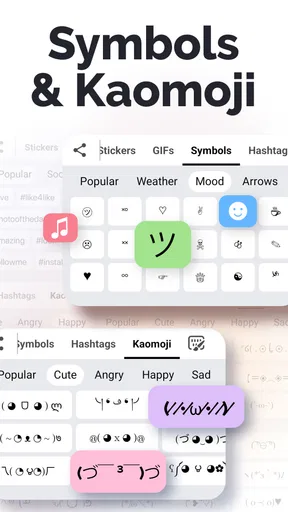
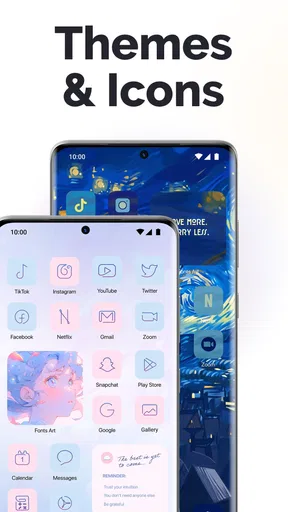
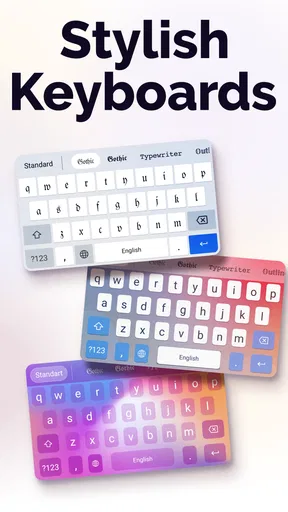
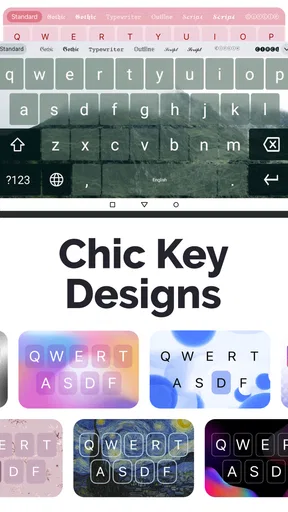
Our Review of Fonts Art - Keyboard Fonts
 Analysis by Appyee
I tend to notice keyboard customization apps most when they interrupt a simple task: I want to send a quick message, but I’m suddenly choosing a style, checking how it looks, or wondering why the keyboard I changed is not showing up where I expected. That practical side matters as much as the decorative one. Fonts Art - Keyboard Fonts is a personalization app from AIBY Inc. built around stylized text and keyboard appearance. I see its appeal most clearly when I want a profile caption, a short message, or a note to feel a little less plain without turning the whole process into graphic design.
Where setup and everyday use can snag
The first thing I would keep in mind is that a font app and a change to every font on a phone are not necessarily the same thing. Fonts Art is most useful for text entered through its available font and keyboard options; it should not be treated as a system-wide redesign. That distinction can prevent a lot of frustration if a heading in another app still looks unchanged.
Keyboard changes also involve a choice: you may need to select the keyboard you want to use through your device’s keyboard settings before it appears while typing. If it does not show up immediately, I would check the active keyboard rather than reinstalling the app straight away. The precise menus vary between devices and operating-system versions, but looking for keyboard or input-method settings is a sensible first check.
I would also try a new style in a low-stakes place before using it for something important. A decorative font can look appealing in an editor yet feel harder to read in a long message, and unusual characters may not appear identically in every app or on every recipient’s device. For a short social caption, that trade-off may be worthwhile; for an address, work instruction, or anything someone needs to scan quickly, plain text is usually kinder.
Checks that make the keyboard easier to judge
Fonts Art is free to download, with optional in-app purchases ranging from $0.99 to $49.99 per item. I would explore the available choices before buying anything and check the purchase details shown in the app at the time. That gives you a chance to see whether its style range suits your taste rather than paying on the assumption that every look will be included.
It is also worth separating a keyboard’s appearance from the fonts supported by the app where you are typing. If a styled caption looks different after posting, or a symbol becomes a plain character, the receiving app or device may be handling that text differently. I would test one sample in the exact place I plan to use it, then decide whether the result is readable enough to keep.
Recovering your workflow without guesswork
If the keyboard seems to disappear, I would first reopen the keyboard selector while a text field is active and confirm which input option is selected. If the design looks wrong, switch back to a familiar keyboard, then return to Fonts Art and choose a style again. Small checks like these are less disruptive than changing several settings at once, because they make it easier to identify what actually fixed the problem.
For a more reliable routine, I would keep ordinary typing and decorative typing separate in my mind. Use the styled keyboard for a caption, a greeting, or a playful one-line reply, then switch back when speed and clarity matter. That approach also makes it easier to judge whether the app is adding something useful or merely adding extra steps to everyday writing.
Fonts Art is aimed at people who enjoy making their digital presence more personal. It has an Everyone content rating, a 4.5 average from around 414,000 ratings, and more than 10 million installs. Those figures suggest broad interest, but they do not tell me whether its particular visual styles will suit you; the best test is whether you like what you can actually use in your own messages and posts.
Have you ever felt like your text messages needed a little more flair? I recently stumbled upon an app called Fonts Art - Keyboard Fonts, and let me tell you, it’s a game-changer for anyone who loves personalizing their digital conversations. This app is like a treasure trove of funky fonts and artsy keyboards that make your messages pop like never before.
First Impressions and Features
So, let's dive into what makes Fonts Art stand out. Right off the bat, the app is super easy to install and set up. Within minutes, I had access to a myriad of fonts that transformed my regular text into something much cooler. The app is user-friendly, with a sleek design that makes navigation a breeze.
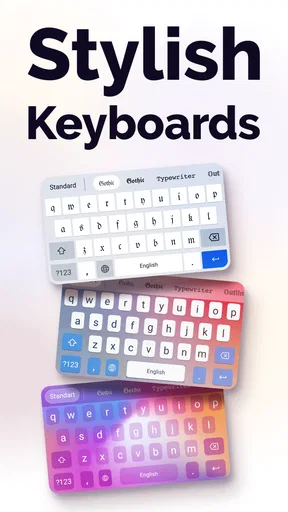
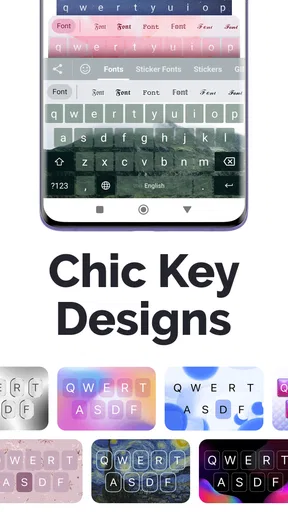
The app doesn’t just stop at fonts. It boasts a variety of keyboard themes that are visually stunning. Imagine having a keyboard that matches your mood or even the season—pretty neat, right? The themes range from minimalistic to downright vibrant, catering to all kinds of tastes. And for those who love a bit of bling, there are some glittery options too!
Customization Galore
One of the app's standout features is its customization. You can tailor your keyboard with your favorite colors and styles. I found myself spending a good chunk of time just playing around with different combinations. And for someone who likes their digital space to reflect their personality, this app is a dream come true.
Not only does the app allow you to customize fonts and keyboards, but it also offers cool emoji art and text decorations. I had a blast sending messages that looked like mini artworks. It's these little touches that make conversation a lot more fun and engaging.
Where this kind of personal touch works best is in short, visual messages rather than every sentence I type. For instance, I might use a decorative greeting in a group chat or style a brief caption before sharing a photo, then return to ordinary typing for the conversation that follows. That keeps the novelty without making friends work to decipher a whole paragraph. It is also a useful way to find out which characters display reliably in the apps I use most.
Performance and Usability
In terms of performance, I was pleasantly surprised. The app runs smoothly without any noticeable lag, even when switching between fonts and themes. It integrates seamlessly with other apps, meaning you can use your fancy new fonts in messages, social media posts, or even emails.
One thing I noticed is that the app does require full access to your device's keyboard settings. I know this can be a concern for some users, but the app assures privacy and doesn’t store your information. Still, it’s something to consider if privacy is a top priority for you.
That keyboard access is a decision I would make deliberately, not just tap through because the setup screen asks. A keyboard is where private text is entered, so anyone uneasy about enabling a third-party keyboard should pause, read the permission and privacy information presented in the app and on their device, and decide whether the customization is worth that level of access. If not, using a font-style tool only where it does not require changing the active keyboard—or staying with the phone’s built-in keyboard—is the more comfortable choice.
There is also a practical distinction between a keyboard that looks customized and text that remains compatible everywhere. I would avoid relying on unusual letter forms for usernames, searchable labels, or anything another person may need to copy accurately. A stylish caption can be expressive, but stylized characters can be less convenient for search, accessibility tools, or readers who prefer familiar text. Keeping key information in standard characters and using decoration sparingly is a good compromise.
When another option makes more sense
Compared with the keyboard already included with a phone, Fonts Art is for visual choice rather than maximum simplicity. A standard keyboard is usually the better fit if I care most about predictable autocorrection, a familiar layout, and fast typing with no extra setup. Fonts Art makes more sense when I regularly want themed keys, decorative text, or a distinctive look for social posts and short messages.
It is also different from a full graphic-design app. If I need precise control over a poster, a carefully arranged invitation, or text placed on an image, I would use a design tool that lets me position and size elements directly. Fonts Art is better suited to typing and lightweight personalization than to building a finished visual composition. Knowing that boundary helps me choose the right tool instead of expecting a keyboard to replace a layout editor.
A realistic daily use might be writing a quick photo caption during a break: I open the social app, switch to a preferred style, type a short line, and check the preview before posting. If the platform displays the characters oddly, I can replace the caption with ordinary text rather than troubleshooting the whole phone. For a longer email later, I would switch back to my regular keyboard. This selective approach gives the app a clear job and avoids turning every message into a formatting experiment.
Customization Galore
One of the app's standout features is its customization. You can tailor your keyboard with your favorite colors and styles. I found myself spending a good chunk of time just playing around with different combinations. And for someone who likes their digital space to reflect their personality, this app is a dream come true.
Not only does the app allow you to customize fonts and keyboards, but it also offers cool emoji art and text decorations. I had a blast sending messages that looked like mini artworks. It's these little touches that make conversation a lot more fun and engaging.
Performance and Usability
In terms of performance, I was pleasantly surprised. The app runs smoothly without any noticeable lag, even when switching between fonts and themes. It integrates seamlessly with other apps, meaning you can use your fancy new fonts in messages, social media posts, or even emails.
One thing I noticed is that the app does require full access to your device's keyboard settings. I know this can be a concern for some users, but the app assures privacy and doesn’t store your information. Still, it’s something to consider if privacy is a top priority for you.
For troubleshooting, I would change one thing at a time. First confirm that the intended keyboard is selected; next, test the same short phrase in another text field; then check whether the result changes only in one particular app. If it works in one place but not another, that points toward an app-specific display or text-handling difference rather than a reason to reset everything. If it does not appear anywhere, returning to the keyboard settings and reviewing the setup is a more useful next step than repeatedly changing themes.
Fonts Art is free to download and is currently at version 2.78.8, with a minimum operating-system requirement of 10. It was released on July 1, 2020, and has received 7.7 thousand reviews. I would check compatibility on the device I plan to use, especially if it is an older one, and remember that the app’s version and available options can change over time. Those details help set expectations, but the day-to-day question remains whether the styles feel comfortable enough to use.
Final Thoughts
Wrapping it up, Fonts Art - Keyboard Fonts is a must-have for anyone looking to inject some personality into their digital communications. It’s not just about fonts; it’s about expressing yourself in a way that text alone sometimes can’t capture. The app is continually updated with new styles and features, so there’s always something fresh to look forward to.
Whether you’re a casual texter or someone who lives on social media, this app adds a layer of creativity that makes typing fun again. So, why not give it a shot? You might just find yourself wondering how you ever lived without it!
My practical verdict
I would recommend Fonts Art to someone who enjoys small visual touches and is happy to switch keyboards when a message calls for a different look. The app’s Personalization focus is clear, and AIBY Inc. has built its appeal around expressive text and keyboard styling rather than replacing every writing tool on a phone. It is especially suited to people who post often, enjoy decorating short messages, or like changing the feel of their keyboard to match their own taste.
I would skip it if I rarely customize my phone, need a keyboard that behaves exactly like the default in every situation, or do not want to enable a third-party keyboard. I would also avoid it for communication where legibility, copying, or consistent display matters more than appearance. In those cases, the built-in keyboard or a dedicated design app is a better fit. For everyone else, the sensible approach is to try the free experience, test styles in the apps they actually use, and keep the decorative option for the moments when a little flair genuinely improves the message.
Privacy and Permissions
See what permissions an app requests and how it handles your data.
- Location
- approximate location (network-based)
- Photos/Media/Files
- read the contents of your USB storage, modify or delete the contents of your USB storage
- Storage
- read the contents of your USB storage, modify or delete the contents of your USB storage
- Wi-Fi connection information
- view Wi-Fi connections
- Other
- view network connections, pair with Bluetooth devices, full network access, reorder running apps, set wallpaper, control vibration, prevent device from sleeping, add words to user-defined dictionary, install shortcuts, uninstall shortcuts, Google Play license check
Verdict
Strengths of Fonts Art - Keyboard Fonts
- Wide variety of stylish fonts available.
- User-friendly interface with easy navigation.
- Seamless integration with social media apps.
- Customizable keyboard themes enhance aesthetics.
- Regular updates with new fonts and features.
Limitations of Fonts Art - Keyboard Fonts
- Premium fonts require in-app purchases.
- May slow down typing speed slightly.
- Limited free options compared to premium.
- Occasional ads can interrupt usage.
- Some fonts may not support all languages.
Other Releases by AIBY Inc.
View All
ChatOn - AI Chat Bot Assistant
Productivity4.5

Plantum - Plant Identifier
Education4.4

Themify: Theme & Icon Changer
Personalization3.7

Coin ID - Coin Identifier
Tools4.3
Similar Picks in This Category
View All
Microsoft SwiftKey AI Keyboard
SwiftKey4.3

Wallpapers
Google LLC4.1

Zedge™ Wallpapers & Ringtones
Zedge4.7

Yandex Browser with Alice AI
Direct Cursus Computer Systems Trading LLC4.3

Ringtone Maker:create ringtone
Big Bang Inc.4.7

Fonts Keyboard
Fonts Keyboard3.9
Frequently Asked Questions
What features does Fonts Art - Keyboard Fonts offer?
Fonts Art - Keyboard Fonts provides a wide variety of unique and stylish fonts to customize your keyboard. It includes options for different text styles, emojis, and symbols that can be used across social media platforms, messaging apps, and more. The app also supports easy integration with your existing keyboard settings.
Is Fonts Art - Keyboard Fonts free to use?
Fonts Art - Keyboard Fonts offers a free version with basic features and a selection of fonts. However, for access to the full library of fonts and additional customization options, users can opt for in-app purchases or a subscription plan. This allows for a more personalized typing experience.
How does Fonts Art - Keyboard Fonts affect device performance?
Fonts Art - Keyboard Fonts is designed to be lightweight and efficient, minimizing its impact on your device's performance. Users have reported smooth operation without significant battery drain or slowdown. However, enabling numerous features simultaneously may vary performance based on the device's specifications.
Is Fonts Art - Keyboard Fonts compatible with all devices?
Fonts Art - Keyboard Fonts is compatible with most Android and iOS devices. However, some older models or those with outdated operating systems might experience limitations or may not support all features. It is recommended to check the app's requirements in the app store before downloading.
How user-friendly is Fonts Art - Keyboard Fonts?
Fonts Art - Keyboard Fonts is designed with a user-friendly interface, making it easy to navigate for users of all experience levels. The app provides a simple setup process and clear instructions for customizing your keyboard. Support and FAQs are also available within the app to assist with any issues.
